Member Tools
- 4.3
- Rating
- 1.00M
- Installs
- Free
- Price

 Analysis by App-foxy
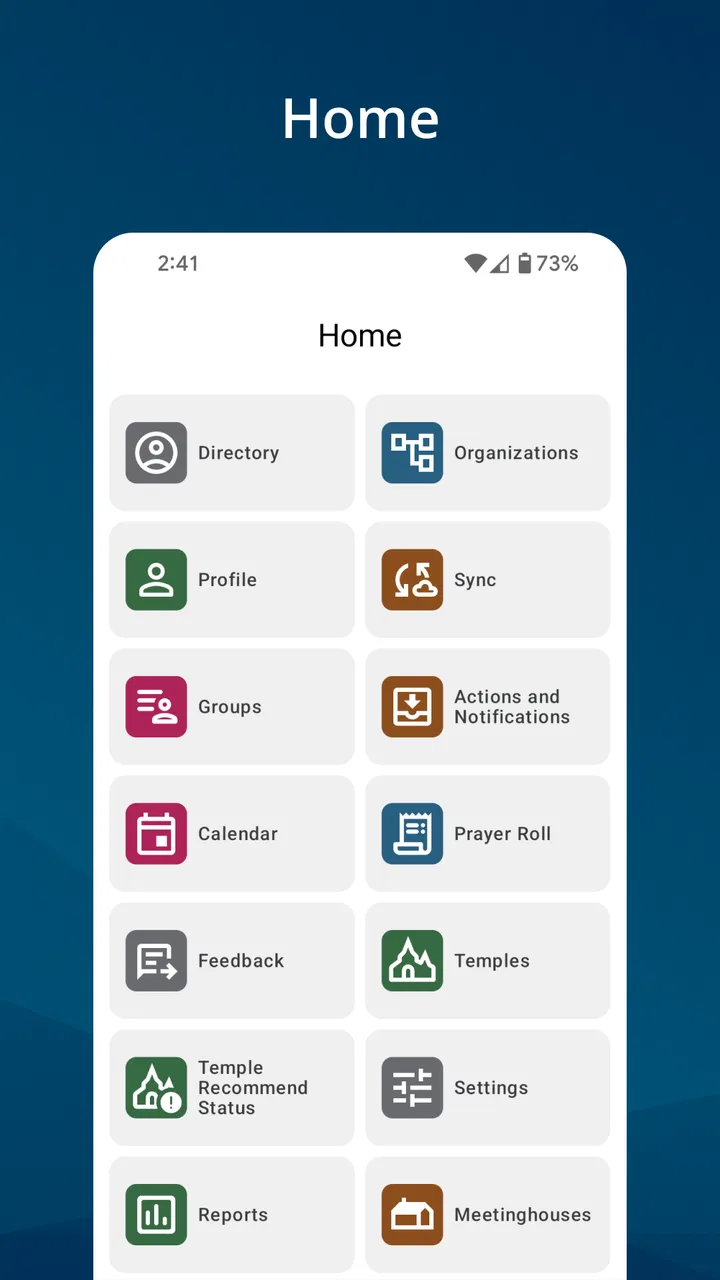
I approached Member Tools as a practical companion rather than as a replacement for every church resource. It is a free Books & Reference app from The Church of Jesus Christ of Latter-day Saints, designed around member contact, event calendars, meetinghouse locations, and temple information. That focus makes its value quite different from a general scripture reader or a broad calendar app: it brings several church-related tasks into one place, provided the information you need is available through your account and local organization.
My overall impression is that the app is most useful when I need a quick answer while moving through the day. I can imagine checking an event before leaving home, looking up a member’s contact details, or finding a nearby meetinghouse without switching between unrelated tools. The experience is not perfect, especially for people who need highly customizable text, strong visual contrast, or very simple navigation, but it can reduce a surprising amount of small friction for active members.
How Member Tools works in everyday use
I find Member Tools most useful when I treat it as a church-specific starting point, not a complete planning system. Its local information can help me decide what to check next, while a personal calendar or navigation app may still be better for managing the rest of my day. That distinction matters most when I’m coordinating plans: I can use the app to verify church details, then move them into the tools I already rely on.
You May Also Like

 Blood Strike: 2.5 Anniversary
Blood Strike’s Loadouts Turn Every Drop Into a Tactical Gamble
A close look at Blood Strike’s custom loadouts: how fast access to signature weapons reshapes its battle royale rhythm, rewards preparation, and narrows the gap between fights.

 Pandora - Music & Podcasts
Pandora’s Music Is Easy to Start, but Harder to Recover
Pandora’s strength is its low-effort path from a seed to a station. Its weak spot is how much confidence it asks you to place in connection, setup, and quiet recovery.

 8 Ball Pool
 Is Built on Rivalries, Rematches, and Routine
A close look at the rivalries, rematches, shared routines, and unanswered safety questions that turn a quick pool match into a persistent mobile community.

 Samsung Music
’s Quiet Strength Is Playing What You Already Own
Its reach comes less from spectacle than from dependable access to a personal library. That simplicity is both the app’s strongest retention engine and its ceiling.

 AccuWeather: Weather Radar
AccuWeather Review: A Quick, Clear Forecast for Everyday Decisions
For everyday plans, the best forecast is the one you can understand quickly. AccuWeather makes rain timing, radar, and local conditions easy to act on, with a few trade-offs.

 Hill Climb Racing
Why Hill Climb Racing Still Turns Crashes Into One More Run
A tiny car, a bumpy hill and one more upgrade: Hill Climb Racing keeps resurfacing because its simple chaos makes every near-miss feel personal.
More From Our News Desk



Readability and navigation that favor practical tasks
The app’s purpose is easy to understand from the first use. Instead of presenting a large library of reading material, it concentrates on information that changes with local participation: people, events, meeting places, and temples. That narrower mission helps the interface feel more purposeful than a general-purpose church information search. I am not opening it to browse aimlessly; I am opening it because I want to complete a particular task.
That task-based design is especially helpful when I am already familiar with the terminology used by the Church. A member looking for a calendar or a meetinghouse does not have to translate the request into a complicated search phrase. The app’s organization reflects those everyday needs, which makes it easier to build a routine around checking upcoming activities or locating a place.
At the same time, the experience depends on how comfortable someone is with mobile menus and account-based information. A first-time user may need a little patience to understand where local details live and which parts relate to personal membership information. I would not describe the navigation as difficult, but it is more useful after I learn its structure than during a rushed first session.
For readability, the strongest advantage is the limited scope of each area. Contact information, calendars, and locations are easier to scan when they are not mixed into a long stream of unrelated content. I find that useful on a small phone screen, where a focused screen is less tiring than a crowded dashboard.
There is also a practical distinction between reading information and acting on it. A calendar entry may answer when something happens, but I still need to interpret the details and decide what to do next. Likewise, a meetinghouse listing can help me identify a destination, but it does not remove the need to plan travel. The app supports the decision; it does not replace ordinary judgment.
Useful workflows beyond the obvious store summary
One of the less obvious strengths is the way the app can serve as a single starting point for several small errands. If I am preparing for a busy Sunday or a local activity, I can first check the calendar, then use the location information, and finally contact the relevant person if I need clarification. That sequence is more efficient than searching through old messages, paper notices, and separate map results.
A second useful habit is checking information close to the time I need it rather than relying on a saved screenshot or an old note. Church schedules and local activities can matter precisely because they are tied to a particular congregation or place. Using the app as a current reference reduces the risk of acting on something I copied weeks earlier.
A third insight is that the contact tools are not only for emergencies or formal responsibilities. They can help a new member, a visitor, or someone returning after time away identify the right person to ask about an activity. That makes the app more socially useful than a simple directory, although the quality of the experience naturally depends on whether local information is complete and current.
I also see value for people who coordinate family logistics. One person can check an event, another can confirm the location, and a parent or caregiver can use the contact area to resolve a question without searching through several conversations. The app does not turn those tasks into a fully automated plan, but it places the relevant reference points closer together.
Motor and sensory considerations
For users with limited dexterity, the app’s focused purpose can be an advantage because it avoids making every action compete for attention. There are fewer reasons to wander through a large content library, and a person can open it with a clear goal. That said, I would still expect some users to benefit from a larger display or device-level text adjustments, particularly when reading contact details or event information requires careful tapping.
People with visual sensitivities may appreciate the ability to use the app in short sessions rather than being exposed to a constant stream of changing content. Checking one calendar item or one location is a more controlled activity than browsing a social feed. However, comfort will vary according to the phone, display settings, and personal needs. I would not assume that a focused interface automatically works equally well for every low-vision user.
For users who rely on screen readers or other assistive technologies, the most important practical test is whether labels and controls are announced in a sensible order on their particular device. I cannot treat the app as universally accessible simply because its purpose is straightforward. A person who depends on spoken feedback should try the key tasks first: opening the calendar, selecting an event, locating a meetinghouse, and reaching the contact information they need.
Motor accessibility also includes the effort required to recover from a wrong tap. When an app is used while standing outside a building or preparing to leave home, accidental selections can be frustrating. I found the best approach is to slow down for the first few visits, learn the layout, and then use the app as a quick reference. Familiarity matters more here than speed.
Situational access for busy members and visitors
The strongest everyday scenario is simple: I am about to leave for an activity and cannot remember whether the event is at the usual meetinghouse. Instead of asking several people or searching through a group conversation, I open the calendar and check the associated details. If the location is unfamiliar, I can then use the meetinghouse or temple information as the next reference point. That chain is exactly where the app earns its place on my phone.
It can also help when plans change during the day. A member who is away from home may need to identify a nearby temple or meetinghouse, while someone visiting another area may want a local point of reference. The app is more convenient than carrying printed schedules, and it is less dependent on remembering the names of local buildings.
For someone with limited data confidence, the main benefit is centralization. The user does not have to know which church page contains which kind of information. The app gives a church-specific route to the answer. On the other hand, a person who only attends occasionally may find that a general map service, a phone calendar, or a direct message is faster for one isolated question.
Families can use the app as a shared planning aid, but it works best when everyone agrees on which information is authoritative. I would not copy every event into a personal calendar without checking the source again, because duplicated entries can become outdated. A better workflow is to use Member Tools for the church-specific reference and a personal calendar for commitments I have already decided to attend.
For a new or returning member, the contact feature may lower the social barrier to asking for help. Finding the appropriate person is often harder than writing the question itself. Still, the app should not be treated as a substitute for a welcoming conversation. A directory can point me toward a person; it cannot provide the reassurance or context that a direct introduction offers.
Where the experience still creates barriers
The first limitation is that the app’s usefulness is tied to church participation. If I am not a member, or if I only want general information about religious history and scripture, this is probably not the right download. A scripture-focused app or a public website may serve that purpose better. Member Tools is at its best when I need local and member-oriented information, not when I want a broad reading experience.
The second limitation is the possibility of uneven local usefulness. Contact lists and calendars are only valuable when they reflect the user’s actual circumstances. If an event is missing, unclear, or difficult to interpret, the app cannot resolve the underlying communication problem by itself. I would still confirm important arrangements with a local leader or organizer rather than assuming that one screen contains the complete picture.
There is also a learning curve for people who do not often use church terminology or mobile account tools. The app may feel obvious to an experienced member and less transparent to someone who has recently joined or is helping another person. In that situation, a patient walkthrough is more helpful than simply handing over the phone and expecting the interface to explain everything.
Accessibility is another area where I would keep expectations realistic. The app can support inclusion through focused information and mobile convenience, but that is not the same as guaranteeing an equally comfortable experience for every ability. Users with significant visual, motor, cognitive, or hearing-related needs may need device settings, another person’s assistance, or an alternative communication route for some tasks.
Privacy and social comfort also deserve thought. A contact directory is convenient, but not everyone wants to manage personal communication through a mobile list. I would use the information respectfully, avoid unnecessary messages, and remember that the presence of a contact option does not mean every channel is appropriate for every situation.
How it compares with ordinary alternatives
Compared with a standard calendar app, Member Tools has a clear contextual advantage: it brings church-related events and member information together instead of asking me to maintain every detail manually. A personal calendar remains better for combining work, school, medical appointments, and family plans. I see the two as complements, not competitors.
Compared with a map app, Member Tools is more direct when I am looking specifically for meetinghouses and temples. A general map service may offer stronger travel planning, traffic information, and broader location discovery, while this app keeps the search tied to church places. If I already know the destination and need driving directions, I would probably continue into my usual navigation tool.
Compared with messaging a local leader, the app is faster for checking information that is already organized. Messaging is better when the details are unclear, personal, or time-sensitive. The best workflow is to use the app for the first check, then contact someone when the screen does not answer the real question.
Compared with a general religious reading app, Member Tools is much less about study and much more about participation. Someone looking for books, annotations, audio reading, or a long quiet session may be disappointed because those are not the reasons I would install it. Its value comes from helping me take part in local church life.
Compatibility, cost, and who should install it
The app is free, carries an Everyone age rating, and requires Android 8.0 or later. Its current release is 5.6.0-(108555.3281444), so users on older phones should check compatibility before planning around it. The free price makes it easy to try without financial risk, especially for members who are unsure whether the contact and calendar tools will fit their routine.
The app has been available since December 10, 2010, and its reach is substantial, with over one million installs. It holds a 4.3 average from around thirty-eight thousand ratings, alongside roughly six thousand six hundred written reviews. Those figures suggest that it is an established tool rather than a niche experiment, but they do not guarantee that every local group or every accessibility setup will feel equally polished.
I would recommend it first to active members who regularly need local event information, member contacts, meetinghouse details, or temple locations. It is also worth trying for families coordinating church activities and for people who have recently moved and need a central place to reconnect with local information.
I would skip it if my main goal were scripture study, broad religious reading, general navigation, or a universal calendar. I would also hesitate if I rarely participate in local activities and already have a reliable way to contact the people I need. Installing a specialized app only makes sense when its specialized information saves me time.
My inclusive verdict
Member Tools succeeds because it addresses small but recurring problems: Who do I contact? When is the event? Where is the meetinghouse? Which temple is nearby? In my experience, bringing those questions into one church-focused app is genuinely useful, particularly when I am away from my usual routine or trying to organize several details quickly.
Its inclusive value comes from reducing the amount of searching and remembering required, not from promising a perfect experience for every user. People with different abilities and circumstances may find the focused structure helpful, but they should test the specific tasks they depend on and use device accessibility settings or human assistance when needed. That honest approach is more useful than assuming that one interface can serve everyone identically.
My recommendation is conditional but positive: if your daily or weekly life involves The Church of Jesus Christ of Latter-day Saints, Member Tools is a sensible free reference app to keep installed. I would pair it with a personal calendar, a navigation app, and direct communication when details are uncertain. Used that way, it does not try to do everything; it simply makes several important member tasks easier to reach.
FAQs for Member Tools
01What is Member Tools and who is it designed for?
Member Tools is an application intended to help organizations manage their members, groups, activities, and communication in one place. It may be useful for clubs, associations, teams, communities, or other membership-based organizations. Before downloading, users should confirm that their organization supports the app and understand which features are available to regular members compared with administrators or account managers.
02What can I do with Member Tools after signing in?
The available functions can depend on how the organization has configured Member Tools, but users may be able to view membership information, access announcements, check schedules, communicate with other members, manage registrations, or review organization-related updates. Some sections may remain unavailable until an administrator assigns the correct permissions, so installing the app alone may not provide access to every feature.
03Do I need an invitation or an existing organization account to use Member Tools?
In most cases, Member Tools is connected to a specific organization or membership system rather than being a completely independent service. You may need an invitation, membership number, organization email address, or account credentials before you can use the main features. If registration fails, contact the organization administrator first, since access is often controlled outside the app.
04Is Member Tools free to download and use?
The application may be available to download without an upfront charge, but the overall cost depends on the organization using it. Some organizations may include access as part of their membership, while others could charge separate fees for memberships, events, services, or premium functions. Check the app store listing and your organization’s terms before assuming that every feature is free.
05What should I check before downloading Member Tools?
Before installing Member Tools, review its compatibility with your Android or iOS device, the latest privacy information, required permissions, and the account details needed for sign-in. It is also worth checking whether your organization actively uses the platform and whether the app receives regular updates. If you are concerned about personal data, ask the organization how member information is collected, stored, and shared.
Pros
- Quick access to essential member account tools
- Clean interface that is easy to navigate
- Useful for checking membership information on the go
- Helps reduce the need for phone or in-person support
- Convenient access to updates and account-related resources
Cons
- Some features may require an active membership login
- Account tools can vary depending on the organization
- Certain actions may redirect to external webpages
- Limited usefulness for non-members
- Performance may depend on the quality of your internet connection

Member Tools
Gallery